

For many long-time AgilePoint customers, the Outlook Task Add-In has been a convenient way to approve tasks on the go. Simply open the task notification in your inbox and take action with a single click—no need to log in to AgilePoint.
Today, we’re excited to announce that this important feature has been completely rearchitected using TypeScript and React, delivering improved performance, easier manageability, and a host of new capabilities to help users better manage their processes and tasks.
How Does It Work?
Previously, the Outlook Add-In enabled users to act on tasks directly from email notifications. It automatically identified the relevant task and process instance from the notification and even worked on mobile devices and tablets.
With the latest release, we’ve expanded the role of the Outlook Add-In significantly.
What’s New in the Latest Version?
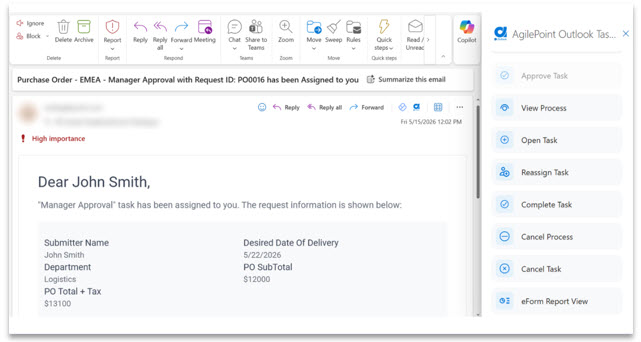
The Outlook Add-In has evolved from a simple task-action tool into a more comprehensive process management experience. Users now have access to many of the same capabilities available in Work Center, including:
- Viewing process details in real time
- Monitoring process progress
- Accessing the eForm Report View
- Taking action on assigned tasks directly from Outlook
This enhanced experience allows users to stay productive without leaving their inbox.
See the screenshot below for additional details.
How Do I Get This for My Users?
Whether you’re deploying the Outlook Add-In for the first time or upgrading from a previous version, getting started is straightforward.
If you’re a new user, visit the AppSource listing for the AgilePoint Task Add-In for Outlook. Your Microsoft 365 tenant administrator will need to grant consent to the application and approve the required permissions.
Already using an older version? Once your administrator grants consent, the add-in will automatically update to the latest experience.
Take this new feature for a spin, and let us know what you think below in the comments!